Game controller button icons
When using a game controller, we plan to display the icon of the controller button assigned to that operation as a guide next to the operation button displayed on the screen.
Currently, the controllers planned to be supported are those for Xbox, Switch, and PlayStation, and the design based on the labeling and shape of each button has been decided as shown below.
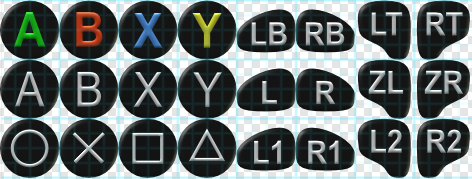
(In Unity’s classification) shoulder and trigger buttons have names specific to each controller, but the button shapes were decided based on various information available online. Although this shape differs depending on the controller, it can also differ depending on the generation of the controller (or the game console it comes with), so we decided to make the shape common to all controllers while clearly distinguishing between shoulder and trigger buttons.